Category: exchange online
-
Reporting on MTA-STS Failures
This article is a follow up to the Enabling Better Mail Flow Security for Exchange Online which discusses setting up MTA-STS and in this article we cover the reporting for MTA-STS. To get daily reports from each sending infrastructure to receive reports on MTA-STS you just create a DNS record in the following format: It…
-

Enable EOP Enhanced Filtering for Mimecast Users
Enhanced Filtering is a feature of Exchange Online Protection (EOP) that allows EOP to skip back through the hops the messages has been sent through to work out the original sender. Take for example a message from SenderA.com to RecipientB.com where RecipientB.com uses Mimecast (or another cloud security provider). The MX record for RecipientB.com is…
-
Mail Flow To The Correct Exchange Online Connector
In a multi-forest Exchange Server/Exchange Online (single tenant) configuration, you are likely to have multiple inbound connectors to receive email from the different on-premises environments. There are scenarios where it is important to ensure that the correct connector is used for the inbound message rather than any of your connectors. Here is one such example.…
-
Force Mailbox Migration With Bad Items To Complete
It used to be easy to complete an Exchange Server > Exchange Online move request that had bad items, but this has changed recently. In the last short while Move Requests (and Migration Batches) have begun to include a property called DataConsistencyScore If the result from the above is “Investigate” then you will not be…
-
How to Use Set-Place to Configure Your Meeting Rooms
Or Making Your Office 365 Meeting Rooms Accessible or How Wheelchair Users Can Find The Best Meeting Rooms In Your Organization etc. – there are many different titles I can think of for this blog post. They are all to do with setting useful properties against your meeting rooms so that your users can find…
-
Review and Audit Offensive Language in Office 365 Communications
A new feature as of May 2018 in Office 365 is to filter communications based upon the offensive language machine learning filter. This is part of the Supervision settings that have been available for a number of years. The Offensive Language model uses a combination of machine learning, artificial intelligence, and keywords to identify inappropriate…
-
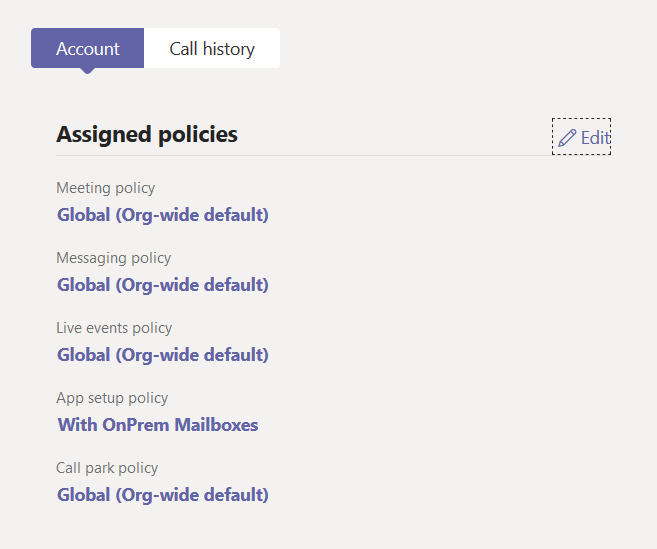
Teams Calendar Fails To On-Premises Mailbox
Article Depreciated: Microsoft now auto-hides the Calendar icon in Teams if your on-premises Exchange Server is not reachable via AutoDiscover V2 and at least Exchange Server 2016 CU3 or later. Once you move your mailbox to Exchange Online (or a supported on-premises version), assuming you did not do any of the below, your Calendar icon…
-
Read Only And Document Download Restrictions in SharePoint Online
Both SharePoint Online (including OneDrive for Business) and Exchange Online allow a read only mode to be implemented based on certain user or device or network conditions. For these settings in Exchange Online see my other post at https://c7solutions.com/2018/12/read-only-and-attachment-download-restrictions-in-exchange-online. When this is enabled documents can be viewed in the browser only and not downloaded. So…
-
![Save Time! Have All Your Meetings End Early [or start late]](https://c7solutions.com/wp-content/uploads/2019/04/image_thumb-1.png)
Save Time! Have All Your Meetings End Early [or start late]
Updated April 22nd 2021 with new global default settings I am sure you have been in a meeting, where the meeting end time rolls around and there is a knock at the door from the people who want the meeting room now, as their meeting time has started and yours has finished. What if you…
-
Too Many Folders To Successfully Migrate To Exchange Online
Exchange Online has a limit of 10,000 folders within a mailbox. If you try and migrate a mailbox with more than this number of folders then it will fail – and that would be expected. But what happens if you have a mailbox with less than this number of folders and it still fails for…
-
Exchange Move Requests | Large Items | And Setting TCP KeepAliveTime To A Large Value
I have seen this situation a number of times. A large mailbox (or mailbox and archive) wont move to the target because the process of checking what the changes are in the mailbox take too long, the network or Exchange Server times out the users move and then reports the mailbox is locked. The fix…
-
CRM Router and Dynamics CRM V9 Online–No Emails Being Processed
This one is an interesting one – and it was only resolved by a call to Microsoft Support, who do not document that this setting is required. The scenario is that you upgrade your CRM Router to v9 (as this is required before you upgrade Dynamics to V9) and you enable TLS 1.2 on the…
-
Read Only And Attachment Download Restrictions in Exchange Online
Microsoft have released a tiny update to Exchange Online that has massive implications. I say tiny in that it take like 30 seconds to implement this (ok, may 60 seconds then). When this is enabled, and below I will describe a simple configuration for this, your users when using Outlook Web Access on a computer…
-
Public Folder Migrations and the Changing Cmdlets
To complete a public folder migration from Exchange 2013/2016 to Exchange Online you need to run Set-OrganizationConfig -PublicFolderMailboxesLockedForNewConnections $true But if you look at lots of the documentation that is out there with their tips and tricks etc. you will see that lots of them say: Set-OrganizationConfig –PublicFoldersLockedForMigration $true So very near – but its…
-
Test Connectivity Website and TLS 1.2
An excellent resource for Microsoft Exchange Server and Exchange Online administrators and consultants is the Remote Test Connectivity website at http://exrca.com or https://testconnectivity.microsoft.com/. Here I am going to document an error that indicated that the Exchange Server (in this case) was not working, but we could see that the phone was connecting fine to the…
-
Public Folder Sync–Duplicate Name Error
I came across this error with a client today and did not find it documented anywhere – so here it is! When running the Public Folder sync script Sync-ModernMailPublicFolders.ps1 which is part of the process of preparing your Exchange Online environment for a public folder migration, you see the following error message: UpdateMailEnabledPublicFolder : Active…
-
Azure Information Protection and SSL Inspection
I came across this issue the other day, so thought I would add it to my blog. We were trying to get Azure Information Protection operating in a client, and all we could see when checking the download of the templates in File > Info inside an Office application was the following: The sequence of…
-
CannotEnterFinalizationTransientException On Exchange Move Request
Did not find a lot on the internet on this particular error, so I guess it does not happen very often, but in my case it delayed to move of the mailbox in question by a week or so until I could resolve it. When a mailbox is moving to a different Exchange organization (cross-forest…
-
Anonymous Emails Between On-Premises and Exchange Online
When you set up Exchange Hybrid, it should configure your Exchange organizations (both on-premises and cloud) to support the fact that an email from a person in one of the organizations should appear as internal to a recipient in the other organization. In Outlook that means you will see “Display Name” at the top of…
-
New Underlying Search Functionality in Exchange Online
Mentioned during Microsoft Ignite 2017, there is a new search functionality in place within Exchange Online. Not all mailboxes are able to make use of the new functionality, such as hit highlighting and search results being shown in-line with the results highlighted in context with the results. The reason that the functionality is not available…