
You used to be able to add sender email addresses to the preset security policies so that those senders would not be flagged as impersonation attempts. For example, my email starts brian.reid@ [mydomain.com], but an email from brian.reid@ [gmail.com], for example, is likely to trigger impersonation blocks and dropping the email into the quarantine.
Of course, if this is not an additional email for the same person or an email from some known individual who happens to match with a protected user in the impersonation list, then you don’t want to be adding them at all.
But, and the purpose of this short blog post, is that it used to be possible to add email addresses and domains to the list in the Microsoft Security portal, but now you can only add domains and it says “Email messages from these domains will not be flagged as impersonation, to add specific senders use PowerShell.“
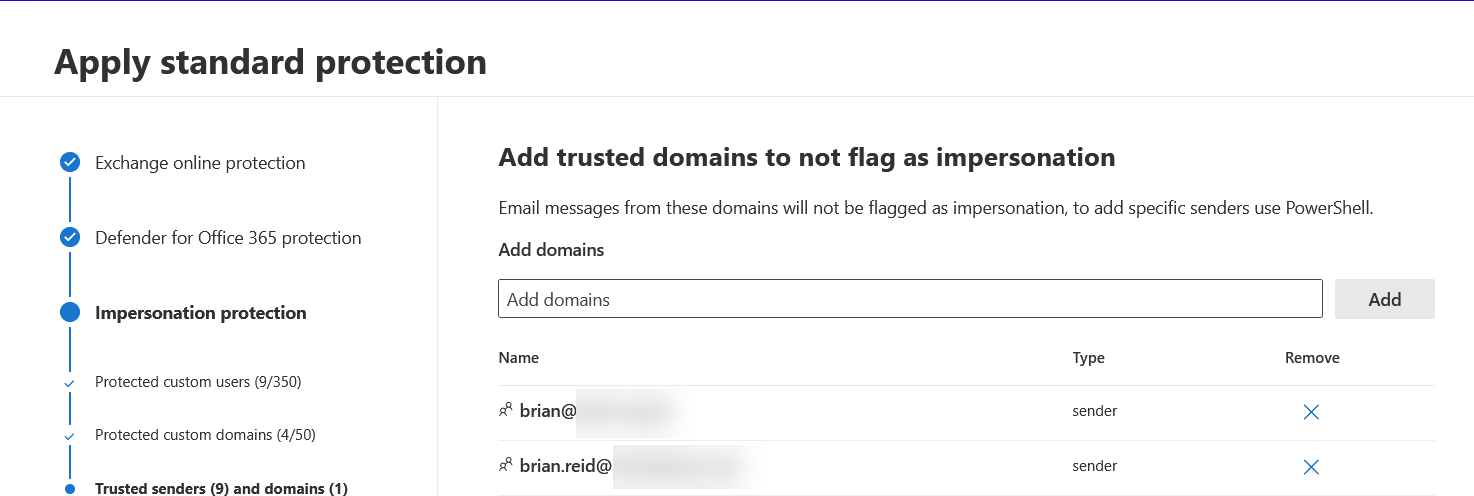
So how do you do this in PowerShell – you need the Exchange Online PowerShell module loaded and connected to your tenant, and then you run the Set-AntiPhishPolicy to update the ExcludedSenders list.
You need to update the list of ExcludedSenders and not just provide a single user, as that will replace the entire list with the one new entry.
So the following will connect to your Exchange Online instance, store the current list of ExcludedSenders in a variable so that if you misconfigure you can restore the original list and then add a new sender to the list.
Connect-ExchangeOnline -UserPrincipalName hygiene_admin@tenantdomain.com
$excludedSenders = (Get-AntiPhishPolicy "Standard Preset Security Policy*").ExcludedSenders
Set-AntiPhishPolicy "Standard Preset Security Policy*" -ExcludedSenders @{Add="breid@otherdomain.com"}

# Then to restore the setting if you need to: Set-AntiPhishPolicy "Standard Preset Security Policy" -ExcludedSenders $excludedSenders
Using Set-AntiPhishPolicy “Standard Preset Security Policy” -ExcludedSenders email@domain.com will wipe the whole list and add just one sender. This is why above we store the old value in a variable called $excludedSenders before we make any changes. We use the @{Add=”email”} structure to add the email address to the list. You can add more than one with @{Add=”email1″,”email2″}.
PowerShell will reply with “WARNING: All recommended properties will be controlled by Microsoft.” when updating the preset policies, but this is not one of the controlled values and so you can change it here.

Note also that there are two preset policies, the standard and the strict. The above code sample updates only the standard policy by its English language name. To internationalize this code and to update both policies at the same time, use the following. In the following update the variable $emailToAdd in the first line with the email you want to add to both of your preset policies:
$emailToAdd = "user@domain.com"
$standardPolicy = (Get-AntiPhishPolicy | Where {$_.RecommendedPolicyType -eq "Standard"})
$strictPolicy = (Get-AntiPhishPolicy | Where {$_.RecommendedPolicyType -eq "Strict"})
$excludedStandardSenders = (Get-AntiPhishPolicy $standardPolicy.Name).ExcludedSenders
$excludedStrictSenders = (Get-AntiPhishPolicy $strictPolicy.Name).ExcludedSenders
Set-AntiPhishPolicy $standardPolicy.Name -ExcludedSenders @{Add=$emailToAdd}
Set-AntiPhishPolicy $strictPolicy.Name -ExcludedSenders @{Add=$emailToAdd}
Even if your strict policy is turned off note that you can update the policy as the policy exists, it is just the rule that enforces it is disabled. By updating both policies at the same time you ensure the two preset policies stay up to date.
Finally, you can also add domains to the list using PowerShell as well, and the property to update is ExcludedDomains rather than ExcludedSenders.
Featured image: Person showing white envelope by Erica Steeves
Leave a Reply